Guide · Blog Post
Claude Skills for Operations Teams: Turning How Your Team Works into a Reusable Skill
Most teams use Claude the same way: someone pastes in a long prompt they keep in a doc, explains the house style again, and hopes the answer matches what a colleague would have produced. Claude Skills fix that. A Skill packages a process (the instructions, the templates, the examples, even small scripts) into a folder Claude loads only when the task calls for it. "Claude skills" was one of the few automation searches still growing this autumn, and for operations teams it is one of the most practical AI features to arrive in a while. This is how Skills work, which processes are worth turning into one, and how I build them so they are safe to share.
By Mehadi Hasan 8 min read
1. What a Skill actually is
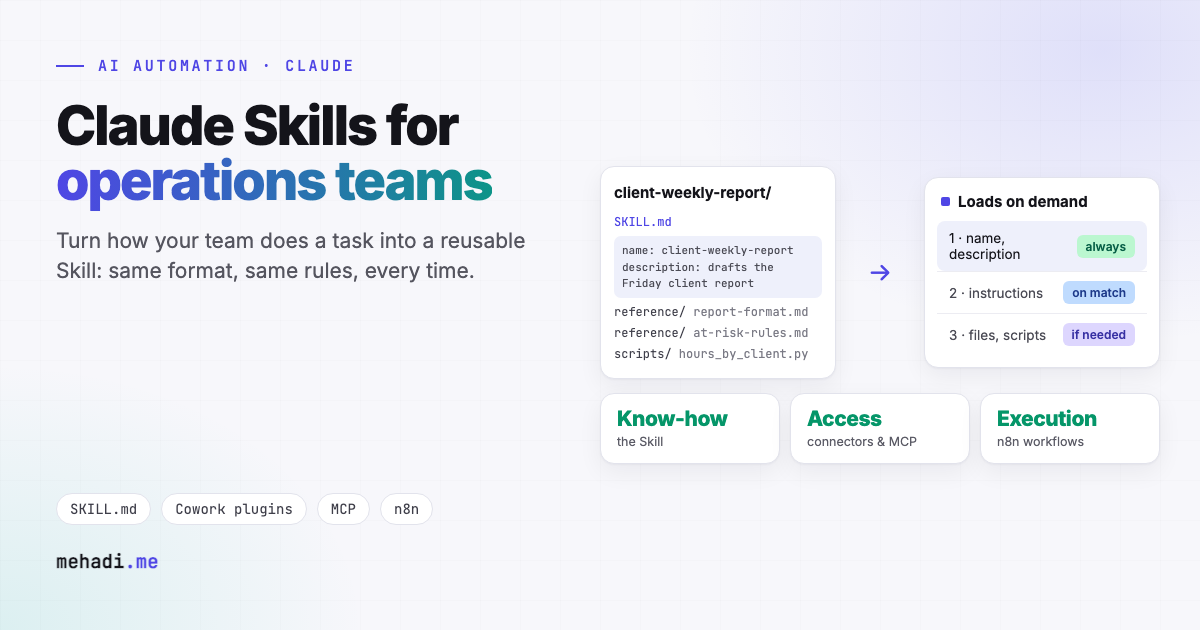
A Skill is a folder with a SKILL.md file at its root. The file starts with two required fields, a name and a description that says what the Skill does and when Claude should use it, followed by the instructions themselves. The folder can also hold reference documents, templates, and scripts (Agent Skills overview).
What makes Skills practical is how they load. Anthropic describes three levels:
- Metadata, always. Only the name and description of every installed Skill, about 100 tokens each, so you can install many.
- Instructions, when relevant. The body of
SKILL.mdloads when a request matches the description. - Resources, when needed. Reference files are read only if the task needs them, and scripts run with only their output entering the conversation.
Skills work in the Claude apps, in Claude Code, and through the API. In Claude Cowork, Anthropic's desktop agent for knowledge work, Skills ship inside plugins that bundle skills, connectors, slash commands, and sub-agents, and admins can run private plugin marketplaces for their organisation (Anthropic).
2. Operations tasks that make good Skills
The best candidates are tasks that need judgement, follow house rules, and happen often enough that everyone doing them slightly differently is a problem:
Weekly client status reports
Your report structure, tone, what counts as "at risk", and what never goes to a client. Combined with a monday.com connection, Claude drafts the report from the board in your format.
Proposal and scope writing
Your service descriptions, pricing rules, standard assumptions, and exclusions, so every proposal starts from the same approved building blocks.
Invoice and document review
The checks your finance team runs: vendor rules, approval thresholds, what to flag. A small script can do the arithmetic so the totals are never guessed.
Request triage
How to classify incoming requests, which board or team each type goes to, and what information is required before work can start.
SOP answers
Your handbook as reference files, so "how do we onboard a new client?" gets your answer, not a generic one.
3. Skills, connectors, and workflows: which does what
The most common confusion I see is treating these as alternatives. They are layers:
- A Skill is know-how. It tells Claude how your team does a task.
- A connector or MCP server is access. It lets Claude read and change data in a system such as monday.com, Google Drive, or your CRM. I walk through one in connecting Claude to monday.com with MCP.
- A workflow is reliable execution. When something must happen on a schedule or a trigger, every time, with logs and retries, it belongs in a tool like n8n. See OpenClaw vs n8n for where agents stop and workflows start.
A good setup often uses all three: a person asks Claude for this week's client report, the Skill supplies the format and rules, the connector supplies the board data, and anything that must also happen automatically every Friday runs as a workflow.
4. How I build a Skill for a team
- Interview whoever does it best. The real rules are rarely written down. Ten real examples, good and bad, tell you more than any SOP.
- Write a sharp description. It decides when the Skill is used at all, so it states both what the Skill does and the requests it should answer.
- Keep the main file short. Anthropic suggests keeping the
SKILL.mdbody under 500 lines (best practices). Long material such as price lists or brand guides goes into reference files that load only when needed. - Script what must be exact. Calculations, date logic, and format checks go in small scripts, so they are computed, not estimated.
- Test against real cases. Run the saved examples before and after every change and compare the results, the same way you would test code.
- Version and ship it. Keep the Skill in git, and distribute it to the team through a private plugin marketplace or your Claude workspace, so everyone uses the same version.
5. Treat Skills like software
A Skill can contain instructions and code that run with Claude's access. Anthropic's own documentation says to use Skills only from trusted sources, such as ones you created or obtained from Anthropic, and to audit any other Skill thoroughly before use. The risk is real: in February 2026, researchers found 341 malicious skills on ClawHub, the community hub for the open-source agent OpenClaw, which uses the same SKILL.md format (The Hacker News). For a business, that means reading every Skill before installing it, preferring ones you build or review, and controlling distribution centrally.
I review public skill packs, with what they contain and whether they are worth installing, in my AI skills directory, including Anthropic's own skills.
Want your team's process turned into a Skill?
Tell me which task your team repeats most and what a good result looks like. I will reply within 24 hours with whether it suits a Skill, a workflow, or both, and roughly what it takes. See my AI agent development service, or browse the AI skills directory.
Get a free 30-min automation auditFrequently asked questions
What is a Claude Skill?
A folder with a SKILL.md file that has a name and a description, followed by instructions, plus optional reference files and scripts. Claude loads only the name and description until a request matches, then the instructions, then extra files only if needed.
Where can Claude Skills be used?
In the Claude apps, Claude Code, and the Claude API. In Claude Cowork, Skills ship inside plugins alongside connectors, slash commands, and sub-agents, and admins can run private plugin marketplaces.
What is the difference between a Skill and an MCP server?
A Skill is know-how: how your team does a task. An MCP server or connector is access: the ability to read and change data in a system. Many setups use both, with workflows for anything that must run automatically.
Are third-party Skills safe to install?
Treat them like software. Anthropic advises using Skills only from trusted sources and auditing any other Skill thoroughly, and malicious skills have already been found on public hubs that use the same SKILL.md format.
Details checked November 3, 2026 against Anthropic's documentation and the sources linked above. Skills and Cowork are changing quickly; check the current docs for your plan before rolling out.