Guide · Blog Post
Two-Way Sync Between monday.com Boards: Where Connect Boards and Built-In Automations Stop, and How to Build One That Holds
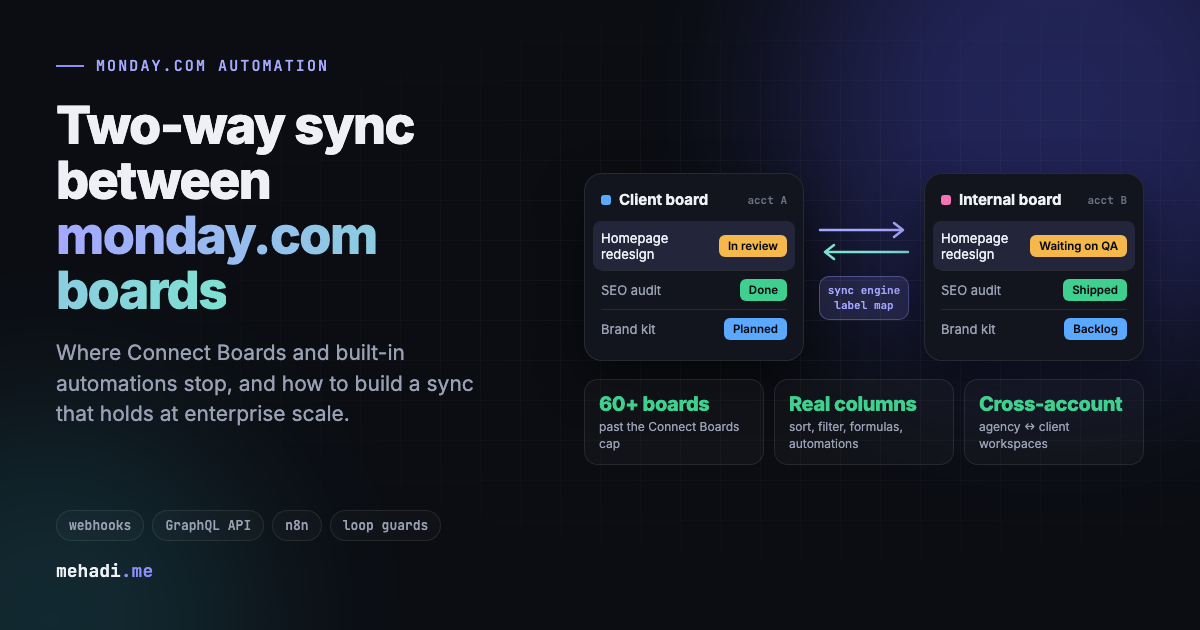
Almost every agency and ops team on monday.com ends up with the same work living on two boards: one the client sees, one the team runs. Keeping them in step sounds like a checkbox. It is not. monday.com can link items and mirror values, but it does not keep two independent items in sync field by field, both ways, and in large accounts that connect many boards the links themselves hit hard limits. This is where the native features stop, and how I build syncs in n8n or custom code that close the gap.
By Mehadi Hasan 8 min read
1. Why teams need the same work on two boards
The pattern shows up in almost every growing account:
- Client board and internal board. Clients see a clean board with friendly statuses. The team works on an internal board with more columns, internal notes, and different labels.
- Sales to delivery. A deal closes on the CRM board and becomes a project on the delivery board, but both teams keep updating it.
- Task boards and portfolio boards. Work happens on task boards; leadership reads a project or portfolio board that should reflect them.
- One team, many departments. Design, content, and dev each have their own board, and the account manager needs one view of everything.
In every case, a change on one side has to show up on the other side, and the other way round, without anyone copying it by hand.
2. What monday.com does natively, and where it stops
Connect Boards links items. It does not sync them.
The Connect Boards column, with its two-way connection option, makes a link visible on both boards (Connect Boards docs). The two items are still separate items with their own values. It also has hard limits: on Pro, a board can connect to 20 other boards, a board holds up to 10,000 linked items, and a single cell holds up to 750 links (linkage limits).
Mirror columns show values, with gaps
A Mirror column displays a column from the connected item, and edits in a mirrored cell flow back to the source. But item names and the Updates section cannot be mirrored, mirrors only go two levels deep, and column summaries are not supported (Mirror column docs). In practice the bigger problem is that the client board shows the internal board's labels and values as they are, with no mapping in between.
Automations from mirrored data are limited
Only some "when status changes" recipes can use a mirrored Status column as a trigger (cross-board automations). Users in the community keep running into the same wall: data from connected items and mirror columns is not available to map in many automations and integrations (community thread).
"Item lives on multiple boards" is not on the roadmap
The feature request for one item on several boards has over 300 votes and is marked "Not on roadmap" (feature request). The request for shared updates between connected items is in the same state (feature request). monday.com's native field-level two-way sync exists for integrations such as Jira, not between two monday.com boards (two-way integrations).
Recipes can loop, and monday only warns you
"When status changes, change status on the connected item" on both boards is the obvious DIY sync. Automations can trigger each other, and monday.com shows a warning before you save a recipe that can loop endlessly, but it does not stop you (why automations get deactivated). Loops burn your monthly action quota and can get an automation deactivated.
At enterprise scale, the links themselves run out
A hub board linked to every project or client board meets the caps on connected boards, linked items, and items per board. Mirrored data goes blank for anyone missing access to one board in the chain (permissions and connected data), mirrors cannot be used like real columns in formulas, grouping, or My Work, and links are lost when items move by automation or a board is archived. Boards in two separate monday.com accounts, such as an agency's and a client's, cannot be linked at all. I list every one of these limits, with sources, in monday.com Connect Boards and automation limits.
Marketplace sync apps fill part of the gap and are worth a look when you need the same item shown on a few boards with little logic. They get harder to justify when you need different labels per board, cascades, updates with mentions, and alerts when something fails.
3. What a real two-way sync has to handle
- Different labels on each board. The internal "Waiting on QA" might be "In review" on the client board. The sync needs a mapping, in configuration, both ways.
- Creation in either direction. A request created on the client board creates its internal twin, linked, in the right group.
- Renames and deletions that cascade. Rename or delete one side and the twin follows, so nothing is left as an orphan.
- Updates and @mentions. A client comment reaches the internal team on the board they use, mentioning the right person, without anyone writing it twice.
- Group moves. When work changes state, the item moves to the matching group on the other board.
- Roll-ups. Project or portfolio boards reflect the task boards beneath them.
- Scale and boundaries. Hundreds of boards, more items than linkage limits allow, and boards in other workspaces or another company's monday.com account.
- Real columns. Synced values that people can sort, filter, group, use in formulas and dashboards, and trigger native automations from, which mirrors cannot always do.
- No echo loops. A change written by the sync must not bounce back.
- Missed events. Webhooks are retried for a while, then dropped. Something has to catch what was missed.
- Alerts. A failed sync has to tell someone, because people trust the board.
4. How I build it: webhooks, n8n, and the GraphQL API
- Webhooks on both boards. monday.com sends events for column changes, name changes, item creation, moves, archives, deletions, and new updates (webhook events). Each event goes to an n8n workflow, which answers monday's challenge request when the webhook is registered.
- A record of which items are twins. For a few boards, a Connect Boards column, so people can still click through. When an account has too many boards or items for linkage limits, or the boards sit in different accounts, the pairs live in a mapping table that the sync owns instead.
- Values written into real columns. Each board keeps its own Status, Date, People, and Numbers columns, filled by the sync, so sorting, filtering, formulas, dashboards, and native automations work on every board.
- Mappings in configuration. Status labels, group names, and which columns sync in which direction live in a mapping, not in workflow logic. Changing a label is an edit, not a rebuild.
- Two loop guards. All writes come from a dedicated integration user, and events made by that user are ignored. Before writing, the workflow reads the target and skips the write if the value already matches.
- One mutation per item. Writes go through
change_multiple_column_values, so an item is never left half-updated, and the workflow stays inside the API's complexity budget. - A scheduled safety net. monday retries a failed webhook every minute for 30 minutes. A scheduled reconciliation, for example every 6 hours, compares linked pairs and fixes anything that drifted.
- Alerts to Slack. Every failure posts the item, the board, and the error to a channel someone reads.
For the API side in detail (authentication, pagination, column value formats, and the webhook challenge in n8n), see using the monday.com GraphQL API with n8n.
5. What this looks like in production
I built this for an agency running client-facing boards, internal boards, and project boards on top of them. Before, boards drifted constantly: statuses changed on one side only, renamed or deleted items left orphans behind, and project boards were rarely current. The sync suite now handles creation, updates, and deletions across linked boards; carries client updates across with user mentions; syncs status both ways through configurable mappings; moves items between groups; cascades renames and deletions; and realigns project and task boards on daily and 6-hour schedules, with failures posted to Slack. Nobody reconciles boards by hand anymore. The full write-up is in the two-way board sync case study.
6. When you do not need a custom sync
- One board only needs to see a few values from another: use Connect Boards and a Mirror column.
- One-way creation, such as a won deal creating a project: a built-in "create item in board" recipe is enough.
- The same item shown on several boards with identical values and little logic: try a marketplace sync app first.
Go custom when you need label mapping, cascades, updates and mentions, roll-ups across many boards, more boards than Connect Boards allows, sync across workspaces or accounts, or the confidence that a failure will be noticed.
Boards drifting apart?
Tell me which boards need to stay in sync and what changes on each side. I will reply within 24 hours with whether native features can do it, or how a custom sync would work and roughly what it takes. See my monday.com automation service.
Get a free 30-min automation auditFrequently asked questions
Does monday.com have native two-way sync between boards?
Not field by field between two separate items. The Connect Boards column can show a link on both boards, and Mirror columns display values from the linked item, but the items keep their own values. monday.com's native two-way field sync is for integrations such as Jira. The feature request for one item living on several boards is marked "Not on roadmap".
Why not just use two recipes that update each other?
Paired recipes can loop: a change on board A updates board B, which updates board A again. monday.com shows a warning before you save a recipe that can loop but does not prevent it, and every bounce uses your monthly automation actions. Recipes also cannot map different labels, cascade renames and deletions, or alert anyone when they fail.
How do you stop a two-way sync from looping?
Two guards together. All writes come from a dedicated integration user, and events made by that user are ignored. Before writing, the sync reads the target value and skips the write if it already matches. Together they also make retries and replays safe.
Can comments and updates sync between boards?
Not natively: the Updates section cannot be mirrored, and shared updates for connected items are not on monday.com's roadmap. A custom sync can listen for new updates on one board and post them on the linked item, mentioning the right people.
What if we have more boards than Connect Boards allows, or boards in another account?
A custom sync does not depend on Connect Boards links. It keeps track of which items pair with which in its own mapping table, writes values into real columns on each board, and can hold a separate token for each monday.com account.
Feature limits checked October 31, 2026 against the monday.com support and developer documentation linked above. monday.com changes features and limits often; confirm current details before you build.