Workflow · Blog Post
Action Items Die After the Meeting: Getting Them onto the Right monday.com Board, Assigned, Automatically
A monday.com board is only as current as the last person who updated it. The biggest gap I see is right after meetings: decisions are made, people say "I'll take that", and then the call ends. Someone is supposed to write it up and create the items, and on a busy day nobody does. A week later the board says everything is on track and the follow-ups have quietly disappeared. Recording the meeting is not the hard part anymore. Getting each action item onto the right board, with an owner and a date, is.
By Mehadi Hasan 6 min read
1. What goes wrong between the meeting and the board
- Notes, but no items. A summary lands in someone's inbox or a doc. Nobody turns it into tasks, so it is read once and forgotten.
- Items without owners. "We should update the pricing page" gets written down, but not who, and not by when.
- The wrong board. In an agency or a company with many projects, the task belongs on one of dozens of boards, and whoever writes it up has to know which.
- Hours of admin. Someone re-listens, writes notes, creates items, and chases owners, after every meeting, every day.
- Leadership meetings, hardest of all. Executives make the most decisions and do the least board admin, so their action items are the ones most likely to vanish.
2. Why a notetaker alone does not fix it
Fireflies, Zoom, Google Meet, Microsoft Teams, and a growing set of monday.com's own meeting features can record and summarise a meeting, and most will list action items. That is the easy half. The hard half is specific to your account:
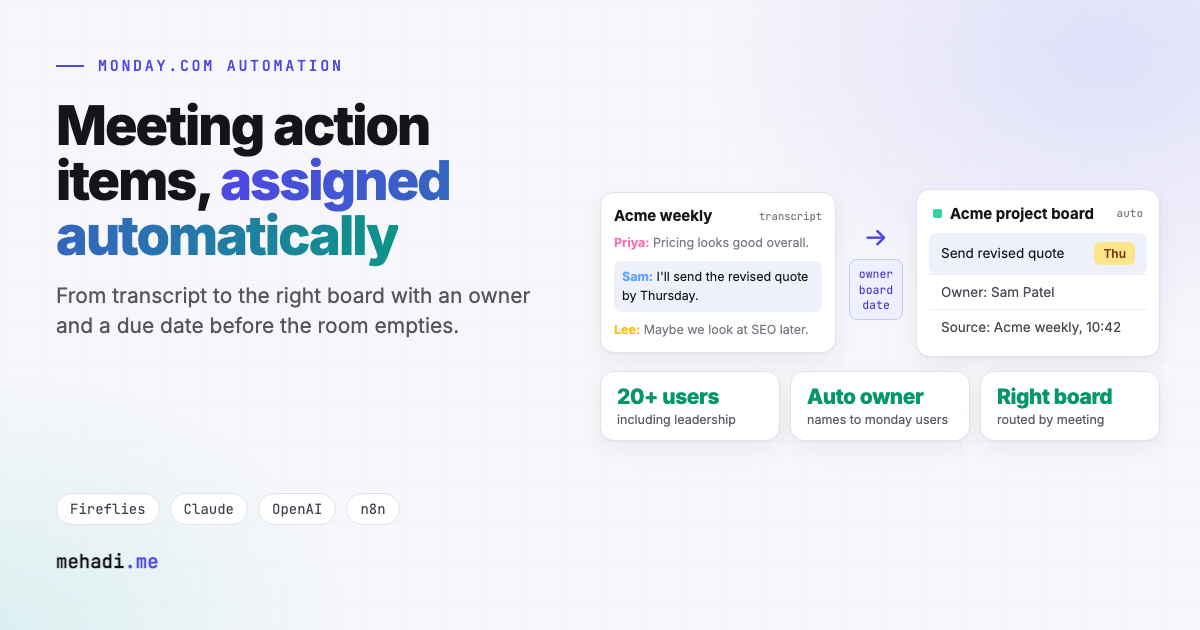
- Who is "Sam"? A transcript says names as people speak them. monday.com needs a user ID, and you may have two Sams.
- Which board? The meeting was "Acme weekly". The tasks belong on the Acme project board, in the right group, with your columns.
- What is a real action item? "Maybe we could look at that sometime" is not a task. "I'll send the revised quote by Thursday" is.
- Has it already been created? The same follow-up is mentioned in three weekly meetings. It should be one item, updated, not three.
3. The pipeline I run in production
- Transcript in. When a recording is processed, the recorder notifies n8n, which fetches the transcript with speakers and timestamps.
- Notes and action items out. Claude and OpenAI produce the summary, decisions, and a structured list of action items: the task, the owner as spoken, the due date if one was said, and the line of the transcript it came from.
- Board routing. The meeting name, or the client or project it mentions, is matched against a routing table that points to the right monday.com board and group.
- Owner matching. Spoken names are matched to monday.com users using the meeting's attendee list and a short list of nicknames, so "Sam" becomes the right person.
- Items created, assigned, and dated. Each action item becomes an item with the owner, due date, and a link back to the meeting notes, so anyone can see why it exists.
- Doubts flagged, not guessed. An item with no clear owner, or a board the routing does not know, goes to a review list for the meeting organiser instead of the wrong place.
- Summaries delivered. The notes go where people read them: Notion, email, or Slack.
By the time people are back at their desks, their tasks from the meeting are already on their board and in their My Work view.
4. Results
I built this pipeline with Fireflies.ai, Claude, OpenAI, n8n, and monday.com, delivering summaries to Notion, Gmail, and Slack. It runs for 20+ users, including the leadership team, and removed the post-meeting admin of writing notes and creating tasks by hand. The full write-up is in the meeting notes to action items case study.
5. Useful extensions
- Update instead of duplicate. Before creating an item, check open items on the board for the same follow-up and add an update to it instead.
- Status from the conversation. "The proposal went out yesterday" can move an existing item to Done, with the quote as the update.
- Client-safe summaries. A shorter version without internal discussion, posted to a client-facing board.
- Pre-meeting briefs. Before the next weekly, post what is still open from last time, so the meeting starts with the follow-ups.
Follow-ups disappearing after your meetings?
Tell me which meetings matter, which recorder you use, and which boards the work belongs on. I will reply within 24 hours with how the pipeline would route your action items and roughly what it takes. See my monday.com automation service.
Get a free 30-min automation auditFrequently asked questions
Can meeting action items go to monday.com automatically?
Yes. A workflow fetches the transcript, has an LLM extract action items with owner, due date, and source quote, routes each to the right board by meeting or project, matches the owner to a monday.com user, and creates the item.
How does it know who the owner is?
It matches the name as spoken against the meeting's attendee list and a short nickname list, then maps that person to their monday.com user. Items without a clear owner go to the organiser for review.
Which recorders work with this?
Any recorder with an API or webhook that provides the transcript. The pipeline in the case study uses Fireflies.ai; Zoom, Google Meet, and Microsoft Teams transcripts work the same way.
Written November 3, 2026, from a pipeline running in production. Recorder and model features change often; check the current APIs of the tools you use before you build.