Guide · Blog Post
Stop Retyping Emails and PDFs into monday.com: Automating Invoices, Orders, and Requests with AI Extraction
In a lot of teams, monday.com is fed by hand. An invoice arrives as a PDF, a customer sends a purchase order, a supplier emails a delivery update, and someone opens each one, reads it, and types the numbers into a board. It is slow, it is where typos come from, and it scales only by hiring. The email integrations help with the first step, but they do not read the attachment, which is where the data lives. This is how I automate the whole step, from inbox to a checked item with the original file attached.
By Mehadi Hasan 7 min read
1. The documents teams retype every day
- Supplier invoices. Vendor, invoice number, dates, totals, and tax copied onto an accounts payable board for approval.
- Customer purchase orders. Each line item becomes a subitem on an orders board.
- Requests by email. Quote requests, service tickets, and booking enquiries that arrive as free text and need to become structured items.
- Forms filled outside monday.com. Scanned applications, certificates, and claims with values someone has to read off a page.
Each one takes a few minutes. Multiply by a few hundred a month and it is a part-time job, with a typo rate nobody measures until a payment goes out wrong.
2. What the native email features do, and do not do
An email can create an item, but it is not read
Email-to-board and the Gmail and Outlook integrations create an item from an email, typically with the subject as the name and the body as an update. Nothing pulls the invoice total or the order lines into columns. The data stays inside text and files that a person still has to read.
Attachments are a long-standing gap
Users have reported for years that attachments are dropped when emails create items through the integrations (community thread). The feature request to add attachments to email integrations is marked "Long Term Backlog", with monday.com saying it decided to focus on other integration capabilities for now (feature request).
Built-in AI works on what is already on the board
monday.com's AI features and marketplace extraction apps can read files once they are on an item, and they are worth testing for simple, consistent documents. They do not decide which emails matter, check the result against your own records, or catch the same invoice arriving twice.
3. The pipeline: inbox to checked item
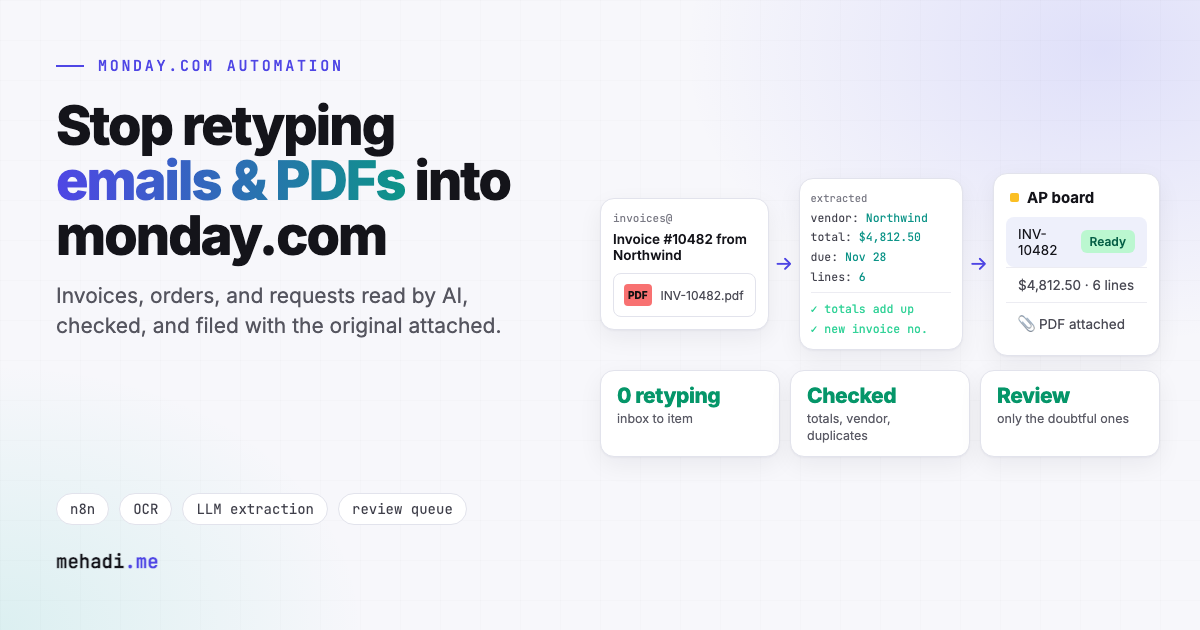
- Watch the inbox. n8n watches a shared mailbox, such as invoices@ or orders@, through Gmail or Microsoft 365. Uploads to a folder or a form work the same way.
- Sort the mail. A language model classifies each email: invoice, purchase order, request, reply to an existing thread, or noise. Only the right types continue, each to its own board.
- Extract to a fixed schema. Text PDFs are read directly. Scans and photos go through OCR or a vision model. The output is always the same JSON shape, for example vendor, invoice number, dates, currency, totals, and line items, so the next steps never guess.
- Check it. Line items must add up to the total, dates must be valid, the vendor must exist in your vendor list, and the invoice number must not already be on the board. These rules catch most extraction errors and every duplicate.
- Create the item. One item with every column filled, a subitem per line, the original PDF uploaded to the file column, and the email text posted as an update so the context travels with it.
- Send doubts to a person. Anything that fails a check, or that the model is unsure of, lands in a "Needs review" group with the reason, instead of going through silently.
- Hand over to monday.com. From there your native approval recipes, notifications, and dashboards take over, because the data is in real columns.
The model cost per document is usually a fraction of a cent to a few cents, depending on page count and which model reads it. The real saving is the minutes of reading and typing, and the errors that no longer happen.
4. Where I have built this
I built unattended bots that collect hundreds of PDF utility bills from two providers, extract billing values with OCR, validate them, load them into PostgreSQL, and archive the source files, with no manual data entry (case study). The extraction and checking approach is written up in invoice OCR, classic OCR vs vision LLMs. Pointing the same pipeline at a monday.com board, with the file uploaded to the item, is straightforward with the GraphQL API (monday.com GraphQL with n8n).
5. How to start small
- Pick one document type with the most volume, usually supplier invoices or purchase orders.
- Collect 30 to 50 real examples, including the ugly ones: scans, multi-page files, and odd layouts.
- Run the pipeline in review mode first, where every item lands in "Needs review", and compare it with what your team would have typed.
- When accuracy holds, let clean documents through automatically and keep review only for the exceptions.
Someone on your team retyping documents into monday.com?
Send me two or three sample documents, with anything sensitive removed, and the board they should land on. I will reply within 24 hours with how extraction would work for them and roughly what it takes. See my monday.com automation service.
Get a free 30-min automation auditFrequently asked questions
Can monday.com read invoice PDFs from email?
Email integrations create an item from an email but do not extract values from attachments, and users report attachments being dropped. The feature request to add attachments to email integrations is marked Long Term Backlog. A custom pipeline reads the inbox, extracts fields with OCR or AI, and creates the item.
How accurate is AI extraction for invoices?
Accurate enough to automate when it is checked: line items must add up to the total, the vendor must exist, dates must be valid, and the invoice number must be new. Documents that fail a check go to a review group instead of through.
What does AI extraction cost per document?
Usually a fraction of a cent to a few cents in model costs, depending on page count and model. Hosting n8n adds a fixed monthly cost.
Feature status checked November 3, 2026 against the monday.com community threads linked above. monday.com changes its integrations often; confirm current behaviour before you build.